TokenMaxxing: How to Get the Most Out of Your AI Models

In brief
- Anthropic's and OpenAI's top models cost 100 times more per token than their smallest ones, yet many users default to the flagship for everything.
- Usage leaderboards at Meta, Amazon, and Uber pushed AI bills up, and Uber burned through its 2026 AI tools budget in about four months.
- Routing tasks to the right model, trimming context, caching and batching cut costs sharply, but there are other techniques to save money.
Meta employees burned through 60 trillion AI tokens in 30 days earlier this year, chasing spots on an internal leaderboard nicknamed "Claudeonomics." Tech columnist Gergely Orosz estimated the tab at roughly $900 million at Anthropic's list prices, though Meta likely pays far less.
Bain & Company consultant Jue Wang sees a quieter version of that waste everywhere: "So many companies, so many users, default to using Opus for everything, including generating emails," she told the Associated Press this summer, referring to Anthropic's high-end models. If you do the same thing, you're hiring Albert Einstein to calculate your change at a MacDonald’s.
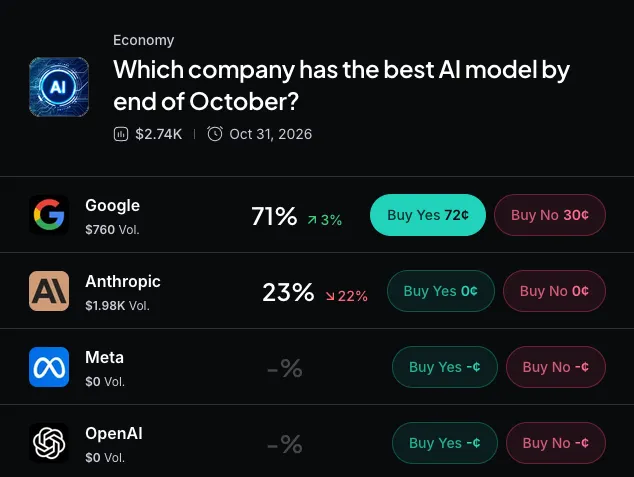
Every word you type into ChatGPT or Claude, and every word it writes back, is metered in tokens, chunks of text that average about three-quarters of a word. On a $20 subscription that meter decides how fast you hit your usage limit. On the API, the pay-per-token access developers use to plug models into their own apps, it decides the bill.
Here's Anthropic's current price list, per million tokens:
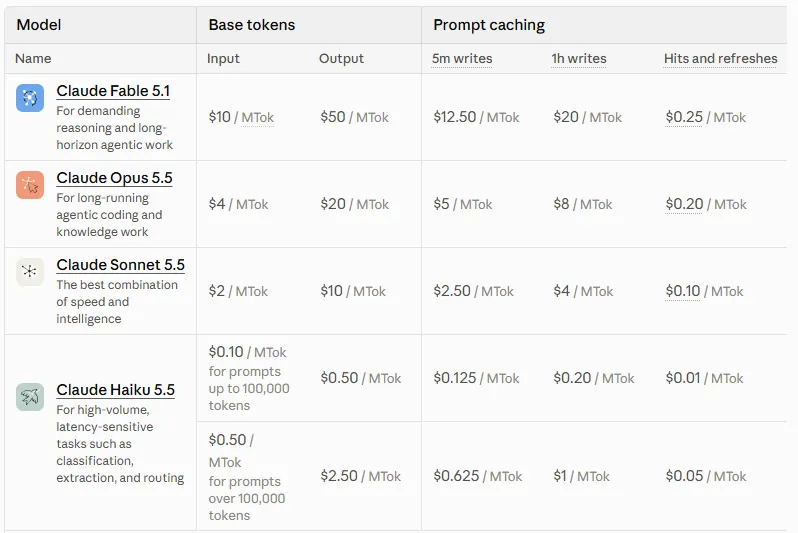
Haiku's rate applies to prompts under 100,000 tokens; longer prompts cost five times as much.
The top model costs 100 times more than the smallest, and OpenAI's own lineup runs the same spread, from $10 to $0.10 per million input tokens. Those per-token prices add up fast for the labs—and you: Anthropic's revenue run rate went from about $9 billion at the end of 2025 to more than $47 billion by May, while OpenAI is fighting a price war to keep up.
A few habits cut that spend sharply, and the first five tips below need zero coding.
What tokenmaxxing means (and what it should mean)
Tokenmaxxing started as a Silicon Valley flex like Meta's Claudeonomics, with Microsoft, Shopify, and Amazon ranking employees on similar token leaderboards. Nvidia CEO Jensen Huang poured fuel on it when he said on the “All-In” podcast in March that he'd be "deeply alarmed" if a $500,000 engineer didn't burn at least $250,000 worth of tokens.
And burn tokens they did… on stupid unproductive stuff.
At Amazon, employees admitted to inflating their numbers by running the internal AI tool on irrelevant tasks, until a senior vice president told staff: "Please don't use AI just for the sake of using AI."
This guide uses the meaning engineers are pushing now: maxxing the value of each token, not the number you spend.
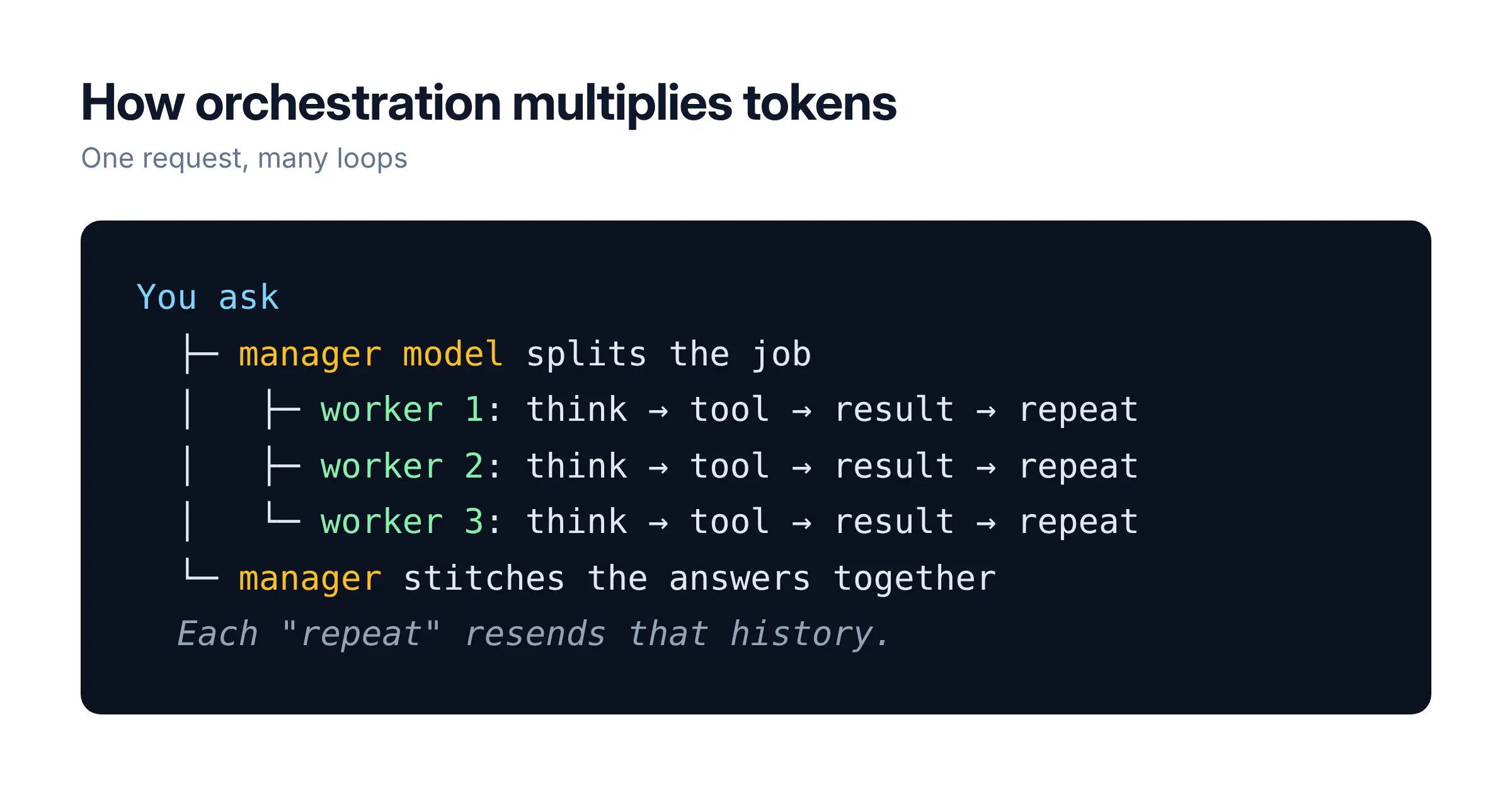
Three concepts explain where the tokens go, starting with the agent loop. An agent is a model that can use tools, so it thinks, searches the web or runs code, reads the result, and goes again until it decides it's done, resending the whole conversation on every lap.
Orchestration multiplies that cost: one model acts as a manager, splitting your request into pieces, handing them to worker models called subagents and stitching their answers back together. Each worker runs its own loop with its own memory, which is why Anthropic says agent teams in Claude Code can use about seven times more tokens than a standard session when teammates run in plan mode, a setting covered in the intermediate tips below.
Graphs are how developers keep those loops from wandering off. Frameworks like LangGraph let you draw a workflow like a subway map, with stations (nodes) doing the work and tracks (edges) deciding where to go next, so the model follows a fixed route instead of looping until it runs out of ideas or budget.
In other words, loops help you automate things and increase quality, but you will also spend a lot of money, so it’s extremely important to be efficient. Here are some tips that may help you with that
Beginner: small jobs, small models
1. Pick the model for the job
If you’re just starting, you’re likely using a graphic user interface to run your AI.
Click the model name in your chat app (at the top of the chat in ChatGPT, next to the send button in Claude or Hermes) and switch to a smaller, faster option for emails, summaries and rewording. Keep the top model for hard reasoning and decisions where a subtle mistake costs real money.
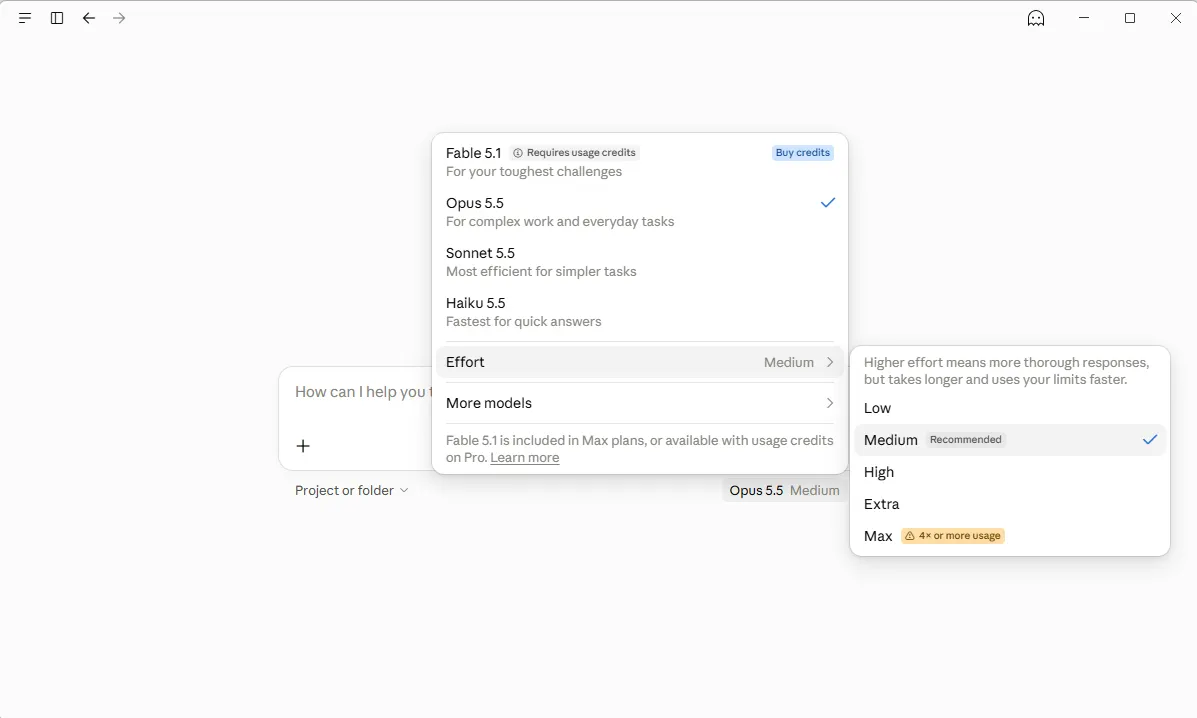
Run five of last week's tasks on both models side by side, and if the small one passes, keep it. On a subscription that stretches your usage limit, and on the API it cuts the bill by up to 99%.
2. Write one good prompt instead of five bad ones
Three rounds of "no, just the total" or “make this better and more accurate” resend the whole chat every time. One clear prompt spells out the job and the exact shape of the answer. Something like this could work:
Extract the invoice number, date, vendor and total from the text below. Keep every value exactly as written. Return one line per field, and write "missing" if a field isn't there.
OpenAI's own testing found that leaner, clearer prompts scored higher while using fewer tokens.
3. Start a new chat when you change topics
The model rereads the entire conversation every time you hit send, so a 50-message thread about your vacation makes your tax question pricier and dumber at once.
Anthropic calls that decay "context rot."
So, for the love of God, start a new chat whenever the subject changes.
4. Ask for the size you need
Output tokens cost five times more than input on Anthropic's and OpenAI's top models. End your prompts with something like "three bullets, under 100 words" or "only the changed lines," and the model has less room to pad.
If the model has a constraint in terms of output length, it will save up tokens, especially if the task is creative (like writing, or researching) and not deterministic (like coding or solving math).
5. Try free before you pay
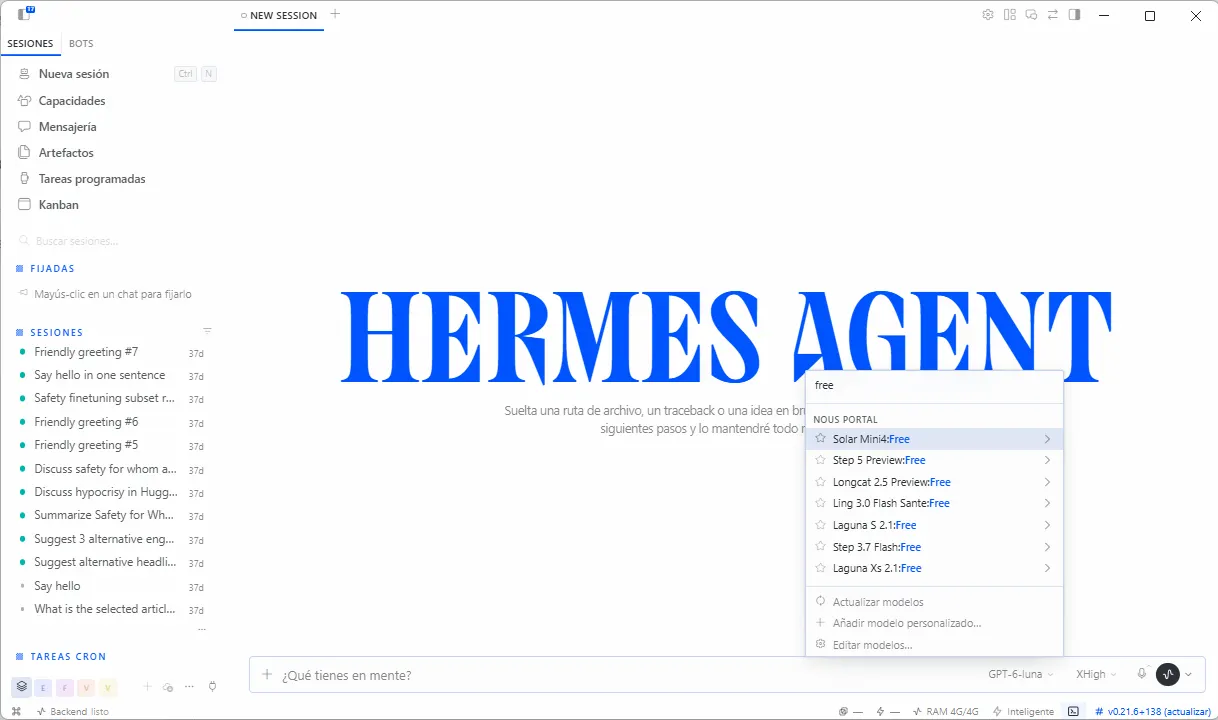
OpenRouter, a site that connects to hundreds of AI models through one account, has a free router that sends your request to one of about 20 no-cost models. You can also run models locally with LM Studio or Ollama on a graphics card with 8GB of video memory or an Apple M-series Mac.
Free tiers can vanish overnight, so don't build anything important on one, and read the data policy before pasting anything sensitive.
That said, you can max out your iterations by using free offers. Hermes has a good selection of free models that may do the job you need, and so does Nvidia. It’s better to adjust a prompt with a free dumber model than paying for a premium model that will do the same thing but faster.
Additional beginner tips
Skip extended thinking for simple questions, or lower the effort setting on newer Claude models where thinking can't be switched off. Anthropic bills the full thinking process as output, including the part you never see.
Claude Pro and Max subscribers who turn on usage credits can set a monthly spend limit under Settings, then Usage.
Intermediate: your agent is reading way too much
From here on, the examples use Claude Code, Anthropic's agent that runs in your terminal and edits files for you; commands go straight into its chat box. Other harnesses will have similar logic.
If you only use the chat apps, tip 8 works in any chat window too.
6. Start cheap, escalate on failure
Type /model to switch models, keep Sonnet as your default, and move up to Opus only when Sonnet fails at something specific, like a bug it can't fix after two tries. For simple subagent jobs, Anthropic's docs suggest setting model: haiku in the subagent's settings.
7. Clear between tasks
Type /clear when you switch to an unrelated task, which costs nothing and drops the old history. Use /compact with a note on what to keep, like /compact keep the database decisions, only when you need the history, since compacting is itself a large request.
8. Let code do the boring math
Pasting a 5,000-row spreadsheet into a chat makes the model read every row, and it can still miscount, because a language model is not a calculator no matter how much you pay for it.
Ask it for a formula or a short script instead, run that yourself, and hand the model only the result.
9. Trim your tools
MCP servers are plugins that connect a model to apps like GitHub or Google Drive, and each one adds tool names and instructions to every session.
Type /context to see what's eating space and /mcp to disable servers the project doesn't use.
Additional intermediate tips
Type /usage to see where your tokens went. Keep your CLAUDE.md (or Soul.md), the instruction file your agent reads at the start of every session, under 200 lines.
For bigger changes, press Shift+Tab to switch to plan mode, where the agent proposes a plan for your approval before touching files, and hit Esc the moment it heads the wrong way. Use /effort to dial reasoning down for simple jobs like renaming a variable.
Anthropic showed an agent's token use dropping from 150,000 tokens to 2,000 when it loaded only the tool definitions it needed, so command-line tools like GitHub's gh, which cost nothing until they run, often beat an always-on plugin.
Advanced: build the guardrails into the system
Take a developer who needs to process 1,000 invoices of 2,000 tokens each, with 200-token answers: the job costs about $30 on Fable 5.1 and about $0.30 on Haiku 5.5, before any of the tricks below.
10. Cache the parts that never change
Put the stable instructions first and the changing parts last, and mark the stable block for caching. In Anthropic's API that's one extra field:
"system": [{
"type": "text",
"text": "Your invoice instructions...",
"cache_control": {"type": "ephemeral"}
}]
Reading from cache costs a fraction of the normal input price while writing to the default five-minute cache costs extra. Check the cache_read_input_tokens field in each response; if it still reads zero after the first call, the cache isn't working.
11. Batch anything that can wait
Both OpenAI and Anthropic process batch jobs at a 50% discount, with OpenAI promising results within 24 hours. Upload the 1,000 invoices as one batch file instead of making 1,000 live calls, and the bill drops heavily.
12. Put agents on a leash
Set a maximum number of steps and a dollar cap for every agent run, and define what "done" looks like before it starts. Claude Code accepts a --max-budget-usd flag for scripted runs, and Shopify uses circuit breakers that can cut off a developer's access immediately if their spend spikes within a day, built to catch runaway agents.
Right now, the normal thing to do is to actually set those agents free and have them loop until the result is deemed perfect. If you don’t have the money, don’t just let your agents decide what is or isn’t “perfect.”
Additional advanced tips
Put critical facts at the start or end of a long prompt. A Stanford-led study found models use information best in those positions and worst when it's buried in the middle.
Pay for a second model to check the work only when a mistake is expensive, such as a contract clause or a payment figure. On OpenAI's API, turn on a hard spend limit for each project, since its spend alerts only notify you and don't stop traffic.
Start with one test
Make the cheapest model that passes your five-task test from tip 1 your default for a week, and switch up only when it fails. Then compare your usage page with the previous week's; on the invoice job, routing alone cut the bill from $30 to $3.90, even after paying Opus 5.5 to redo 300 failures.
Cheaper tokens won’t do the job alone, though: the price of a single token has dropped more than 90% since 2023, according to Silicon Data’s Token Expenditure Index, yet spending on large language models has doubled since late 2025.
Economists call that the Jevons paradox, when a resource gets so cheap that people end up spending more on it in total. A Bain & Co. brief from June found the same pattern, with token costs halving between December 2024 and 2025 while the number of tokens consumed grew 450%.
The upside is that the same falling prices work for you the moment you stop burning tokens for sport: pair them with the habits above, and AI gets cheaper and better at the same time.
Daily Debrief Newsletter
Start every day with the top news stories right now, plus original features, a podcast, videos and more.
Join 72,000+ readers